
The Job Offer That Installs Malware When You Switch Branches
A recruiter sends a "small paid technical task" as a Git repo before the interview. The code looks fine, the dependencies look normal - but the trap isn't in the application code. It's in Git behaviour, and almost nobody checks .git/hooks/ before running an unknown repo.
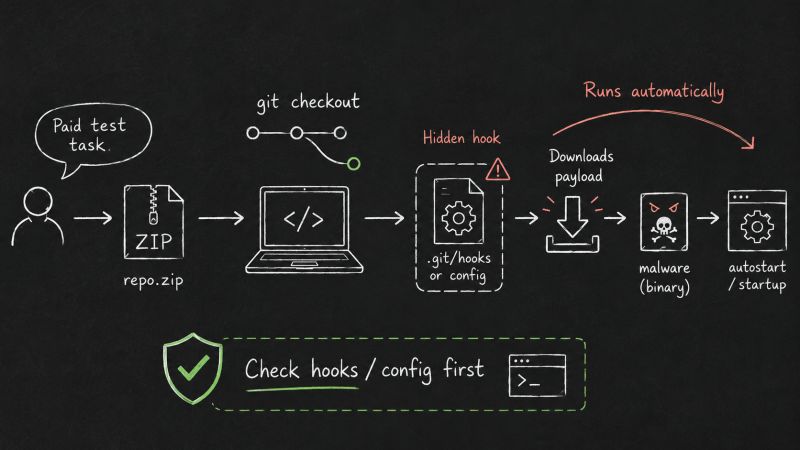
A recruiter sends a "small paid technical task" before the interview. The offer looks attractive: normal website, normal vacancy. The task comes as a ZIP archive with a Git repository.
At first glance, the code looks fine. Dependencies look normal. Nothing obvious in the source files.
But the trap is not in the application code. It is in Git behaviour.
git checkout is enough
In this case, the repository used a post-checkout hook. When the developer
switched branches, Git automatically executed the hook. The hook downloaded a
script, installed Node.js, downloaded another payload, fetched a binary, and
added it to autostart.
No npm install. No make. No explicit "run this script." Just:
git checkout some-branch
And the machine is compromised.
This works because even experienced developers usually review source code,
dependencies, and package files - but almost nobody checks .git/hooks/,
.git/config, .gitattributes, or Git filters before touching an unknown repo.
What DevGuard detects
- suspicious Git hooks, especially hooks triggered by checkout or merge
- custom
core.hooksPathin.git/config - dangerous
filter.*.smudge/filter.*.cleancommands .gitattributesfilters that can execute code during checkout- suspicious
credential.helper,core.sshCommand, andurl.*.insteadOf - risky
.gitmodulesURLs, including IP/localhost targets setup.pyinstall/build overrides with subprocess or network calls- VS Code
tasks.jsonauto-run tasks - Makefile curl-pipe-to-shell patterns
- obfuscated payloads like
base64 -d | sh, hex-encoded shell commands, and Pythonurllib + exec
The important part
Malicious repositories do not need to look malicious in the source code. Sometimes the dangerous part is the repository configuration itself.
Before running - or even switching branches in - an untrusted repo, check:
cat .git/hooks/*
cat .git/config
cat .gitattributes
cat .gitmodules
Or scan it with Pentesterra DevGuard first - a CLI tool that checks your codebase before you push or run unknown code. It works locally, runs in seconds, and does not send your source code anywhere.
https://pentesterra.com/blog/job-offer-that-installs-malware